

Before you start
- IP addressing and subnet masks (see IP address, subnet mask and gateway)
- How NAT works (see Public IP, private IP and NAT)
- VLANs (see understanding VLANs)
In plain words
A firewall is the security desk at the entrance to a site and between its buildings. Each person (each network packet) shows up with where they come from, where they're going and the reason for the visit (the port). The guard reads the list of instructions from top to bottom and applies the first one that matches: let through or refuse. Anything not covered is refused. And once the guard has let someone out, they let them back in without asking again: that's stateful filtering.
This guide explains the principles, whatever the brand. Two tutorials then apply the same plan on OPNsense and on UniFi.
1. What a firewall does
| Function | Role |
|---|---|
| Routing | Connect several networks (internet, LAN, VLANs) and pass packets from one to another |
| Filtering | Allow or block each flow according to rules: source, destination, protocol, port |
| NAT | Translate private addresses into the public address to reach the internet, and publish an internal service |
| VPN | Link sites together, or let remote users connect to the network (WireGuard, IPsec, OpenVPN) |
| Network services | Often DHCP, DNS and NTP for the internal networks too |
| Advanced features ("next generation") | Intrusion detection and prevention (IDS/IPS), filtering by application or website category, inspection of encrypted traffic, stream antivirus |
A firewall filters network flows. It doesn't replace antivirus on the computers, updates or two-factor authentication. See antivirus and system security.
2. Stateful filtering
Every current firewall is stateful: it remembers each allowed connection in a state table. The reply comes back automatically, with no rule needed in the other direction.
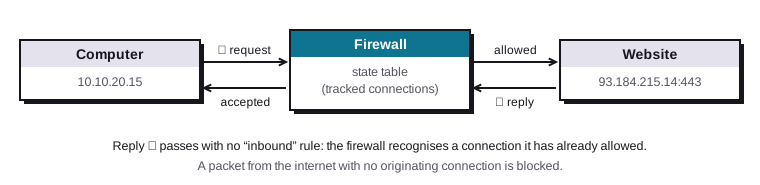
In practice: write rules in the direction in which the connection starts. Allowing "Offices to Servers" is enough for the servers to reply; it does not allow a server to open a connection to a computer.
3. Rules
What a rule contains
| Field | Example | Note |
|---|---|---|
| Action | Allow, block, reject | Block silently drops the packet; reject answers "refused". Block towards the internet, reject internally so that applications fail quickly. |
| Interface or zone | Offices, WAN, DMZ | Where the packet enters the firewall |
| Protocol | TCP, UDP, ICMP | Ping uses ICMP |
| Source | 10.10.20.0/24, an alias, a host |
Where the connection comes from |
| Destination | 10.10.30.5, "Internet", an alias |
Where it's going |
| Destination port | 443, 53, 445 | The service targeted |
| Logging | Yes or no | Log useful blocks and sensitive rules, not everything |
| Description | "Computers to file server" | Essential to find your way around in a year's time |
Order matters
On most firewalls, rules are read from top to bottom, and the first one that matches decides. The following ones are not evaluated. Anything no rule has allowed is blocked by a final implicit rule.
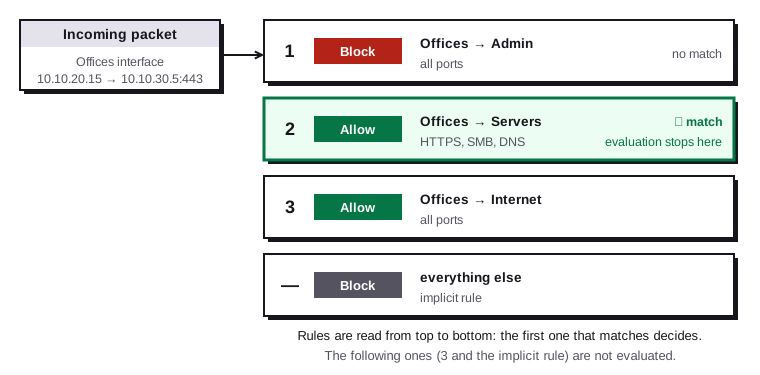
Writing rules that avoid nasty surprises:
- Specific blocks first (for example "Offices to Admin: block"), then the allow rules, then the broadest one ("to the internet").
- A "to the internet" rule written as "destination: any" also opens every other VLAN. Use "destination: anything except private networks" (an alias
RFC1918grouping10.0.0.0/8,172.16.0.0/12and192.168.0.0/16, with the "invert" option), or put the inter-VLAN blocks above it. - Use aliases (named groups of addresses or ports):
File_Servers,Web_Ports. Changing the alias applies to every rule that uses it. - No "any to any" rule, not even a "temporary" one.
Interfaces or zones: two ways of thinking
| Approach | Principle | Examples |
|---|---|---|
| By interface | Rules are attached to the packet's inbound interface: rules on the "Offices" tab filter what leaves the computers. "Floating" rules, evaluated first, can cover several interfaces. | OPNsense, pfSense, MikroTik |
| By zone | Networks are grouped into zones (Internal, Guests, DMZ, External…) and you write zone-to-zone policies | UniFi (since Network 9), Fortinet, Stormshield, Sophos, Palo Alto |
Both lead to the same result. The zone approach reads like a matrix; the interface approach requires remembering that a rule is written where the traffic enters.
4. NAT and port forwarding
| Type | Direction | Use |
|---|---|---|
| Outbound NAT (SNAT, masquerade) | Internal → internet | All private addresses go out with the firewall's public address. Automatic on most devices. |
| Port forwarding (DNAT) | Internet → internal | Publish a service: public port 443 is sent to 10.10.60.10:443 in the DMZ |
| 1:1 NAT | Both | A public address dedicated to one server (when you have several public addresses) |
| NAT reflection (hairpin) | Internal → public address → internal | Let internal computers use a service's public name. Prefer an internal DNS that gives the private address directly. |
A port forward exposes a service to the entire internet. Only publish what needs to be published, put it in the DMZ, keep it up to date, and prefer a VPN for anything administrative (remote desktop, SSH, device web interfaces). See remote access: RDP, VNC, SSH.
5. The ISP router: router mode, bridge mode and "DMZ"
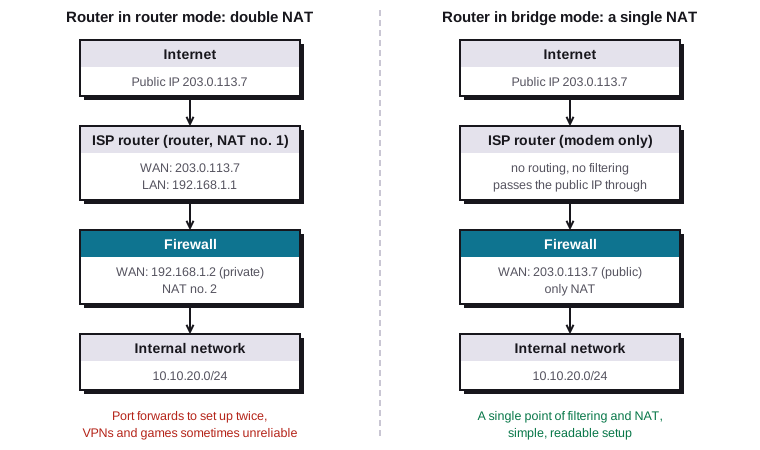
When you add your own firewall behind the internet provider's router, there are three possible setups.
| Setup | Principle | Advantages | Drawbacks |
|---|---|---|---|
| ISP router in bridge mode | The router only acts as a modem: the firewall gets the public address | A single NAT, a single filtering point, simple port forwarding and VPN | The router's own services (Wi-Fi, sometimes phone or TV) may be disabled or reduced; not offered by every router |
| ISP router in router mode + "DMZ" to the firewall | The router sends all incoming traffic to the firewall's WAN address | Works with every router, keeps TV and phone | Double NAT for outbound traffic; the router remains one more device to secure |
| ISP router in router mode, nothing else | Full double NAT | No setting on the router | Every port forward has to be done twice; inbound VPNs and some games or video calls are unreliable |
Whether bridge mode exists depends on the provider and the router model: some offer it in their interface, others only offer the DMZ function towards the firewall, and fully replacing the provider's router is sometimes possible but needs an advanced setup. Check your router's documentation: these options change with the models.
An ISP router's "DMZ" is not a DMZ
On an ISP router, the "DMZ" option means: send all incoming traffic to a single device. If that device is a computer or a games console, it is exposed to the internet without any protection, and it stays on the same network as everything else. This option only makes sense pointed at your firewall.
6. A real DMZ
A DMZ (demilitarised zone) is a separate network for servers that can be reached from the internet: website, mail server, reverse proxy, game server. If one of them is hacked, the attacker is stuck in the DMZ.
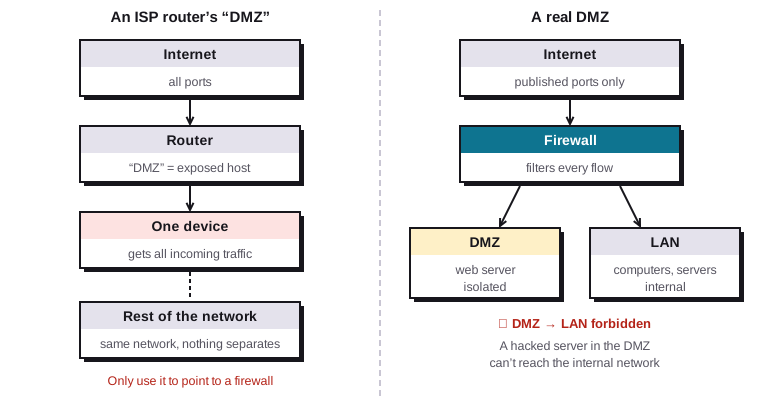
The rules of a DMZ:
| Flow | Rule |
|---|---|
| Internet → DMZ | Only the published ports (443, for example), to the servers concerned |
| DMZ → internet | Only what is needed: updates, DNS, NTP. No free browsing. |
| DMZ → internal networks | Forbidden. If a server in the DMZ needs an internal database, allow only that port to that server, and consider putting the database in the DMZ too. |
| Internal networks → DMZ | Allowed as needed (viewing the website, uploading files) |
| Admin → DMZ | SSH or RDP from the administration network only |
7. VLANs and routing between zones
VLANs split the physical network into several logical networks (see understanding VLANs). The firewall has an interface in each VLAN, over a single tagged cable to the switch (router on a stick), and it decides what passes from one to the other.
The switch that bypasses the firewall
A layer 3 switch with inter-VLAN routing enabled passes traffic without showing it to the firewall. If security between zones matters, leave inter-VLAN routing to the firewall, or filter on the switch with access control lists.
8. A typical segmentation plan
This plan is the common thread of the OPNsense and UniFi tutorials. Adapt the number of zones to your size: a small organisation can start with Offices, Guests and IoT.
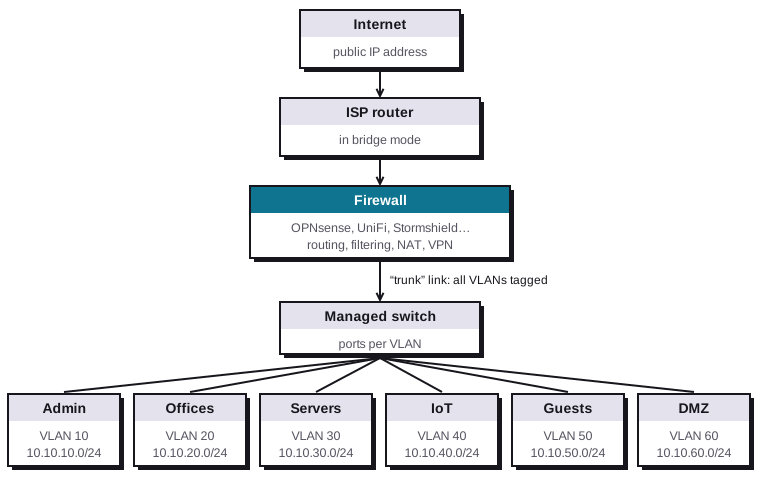
| Zone | VLAN | Network | Gateway (firewall) | Contents |
|---|---|---|---|---|
| Admin | 10 | 10.10.10.0/24 |
10.10.10.1 |
Admin interfaces of switches, access points, hypervisors; administration computers |
| Offices | 20 | 10.10.20.0/24 |
10.10.20.1 |
Workstations and printers |
| Servers | 30 | 10.10.30.0/24 |
10.10.30.1 |
Domain controllers, file servers, internal applications |
| IoT | 40 | 10.10.40.0/24 |
10.10.40.1 |
Cameras, smart devices, TVs, home automation |
| Guests | 50 | 10.10.50.0/24 |
10.10.50.1 |
Guest Wi-Fi: internet only |
| DMZ | 60 | 10.10.60.0/24 |
10.10.60.1 |
Servers published on the internet |
Avoid VLAN 1, the default VLAN on every device: don't use it for any production network.
The flow matrix
This is the central document: you decide before configuring anything what is allowed to talk to what. Read it from the row (source) to the column (destination).
| Source ↓ / Destination → | Internet | Admin | Offices | Servers | IoT | Guests | DMZ |
|---|---|---|---|---|---|---|---|
| Admin | ✔ | — | ✔ | ✔ | ✔ | ✘ | ✔ |
| Offices | ✔ | ✘ | — | ✔ needed ports | ≈ casting, cameras | ✘ | ✔ 443 |
| Servers | ≈ updates | ✘ | ✘ | — | ✘ | ✘ | ✘ |
| IoT | ≈ depends on the device | ✘ | ✘ | ✘ | — | ✘ | ✘ |
| Guests | ✔ | ✘ | ✘ | ✘ | ✘ | — | ✔ public 443 |
| DMZ | ≈ updates | ✘ | ✘ | ✘ | ✘ | ✘ | — |
| Internet | — | ✘ | ✘ | ✘ | ✘ | ✘ | ≈ published ports |
✔ allowed · ≈ allowed for specific ports or hosts · ✘ forbidden. Stateful filtering lets replies back in: "Offices → Servers" doesn't open "Servers → Offices".
Every internal network must also be able to reach the firewall's DNS and NTP (or the domain controllers for domain computers), and the DHCP of its own network.
9. Good practice
- Block everything by default, including outbound for sensitive zones (Servers, IoT, DMZ). A server has no reason to browse the internet freely.
- The firewall's admin interface is reachable only from the Admin VLAN and the VPN, never from the WAN.
- Name and describe every rule, with the date and the person who asked for unusual rules.
- Review the rules every six months: delete those no longer used (hit counters help).
- Log blocks between internal zones: a computer that keeps trying to reach Admin deserves a closer look.
- Back up the configuration after each change, off the device, and test restoring it.
- Update the firewall: it's the most exposed device on the network.
- Test your rules from each zone (a
ping, annmap, a web access), rather than assuming they work. See network troubleshooting. - Document the addressing plan, the flow matrix and the port forwards in your knowledge base.
10. Checklist
| Item | Done? |
|---|---|
| The ISP router is in bridge mode, or its DMZ points to the firewall | ☐ |
| The addressing and VLAN plan is written down, without using VLAN 1 | ☐ |
| The flow matrix is approved before configuration | ☐ |
| Rules are ordered from the most specific to the broadest, with descriptions | ☐ |
| "To the internet" rules exclude private networks | ☐ |
| Port forwards end up in the DMZ, never in the LAN | ☐ |
| The DMZ cannot open connections to the internal networks | ☐ |
| Firewall administration is closed on the WAN side and limited to the Admin VLAN and the VPN | ☐ |
| Outbound filtering is restricted for Servers, IoT and DMZ | ☐ |
| The configuration is backed up off the device | ☐ |
| The rules have been tested from each zone | ☐ |