

Before you start
- For the overall logic between hosted and internal services, see On-premises or SaaS
In plain words
Your email address is the key to your digital life: it's the one that receives the reset links for all your accounts. Entrusting it to a provider is a bit like giving a copy of all your keys to a caretaker. Choosing sovereign email means choosing a caretaker subject to the same laws as you, whose job is to look after your keys, not to read your post in order to sell you advertising.
1. What "sovereign" really means
The word has become a sales pitch. For email, it covers several distinct criteria:
| Criterion | Question to ask | Why it matters |
|---|---|---|
| Jurisdiction | Under which law is the company, and its parent company? | An American company remains subject to the CLOUD Act, even if its servers are in Europe |
| Hosting | Where is the data physically stored? | Determines the access laws and whether the GDPR applies |
| Business model | Who pays for the service? | Free and funded by advertising = your usage is the currency |
| Encryption | Can the provider read your messages? | See section 2 |
| Open standards | IMAP, SMTP, CalDAV, CardDAV, export? | Guarantees you'll be able to leave one day |
| Domain name | Can I use me@mydomain.com? |
Real freedom: see section 3 |
| Longevity and support | How long has the service existed, and how does it respond? | You choose an email service for years |
No provider is perfect on all these points: you have to weigh them according to your use.
2. The levels of encryption
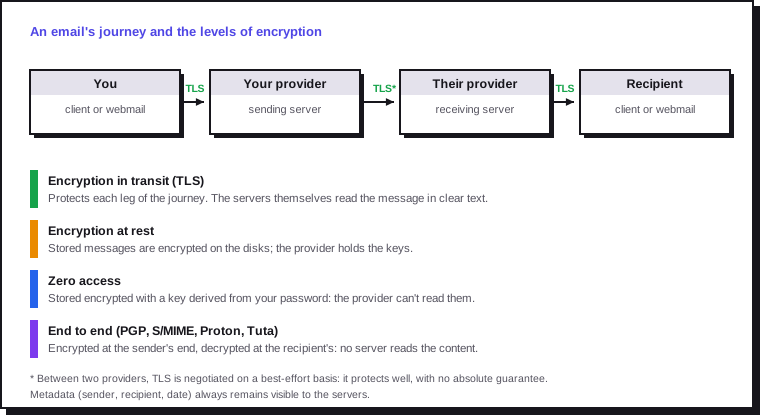
- In transit (TLS): every serious provider does it. It protects the journey, not the storage.
- At rest: the disks are encrypted, but the provider holds the keys and can read the messages (for example on a court order).
- Zero access: stored messages are encrypted with a key that only your password unlocks. The provider can't read them, but nor can it recover your data if you forget the password and the recovery key.
- End to end: the message is encrypted before it leaves. This works automatically between users of the same service (Proton to Proton, Tuta to Tuta), or with open standards (PGP, S/MIME) if the other person uses them too.
Encryption doesn't travel alone
An end-to-end encrypted message sent to a Gmail address arrives… at Gmail, readable by Gmail (unless a separate password is shared, depending on the service). And the metadata (who writes to whom, when) remains visible in every case. Sovereign email mainly protects your mailbox and your usage; for exchanging secrets, an encrypted instant messenger is better suited.
3. The real lever: your own domain name
An address firstname@provider.com belongs to the provider. If the service closes, changes its terms or suspends the account, the address disappears with it.
With your own domain name (contact@mydomain.com), the address belongs to you: you change provider by editing a few DNS records, without telling anyone. It's the best sovereignty investment there is, for a family as much as for a business.
The DNS records to create at the registrar (the exact values are supplied by the email provider):
| Record | Role | Example |
|---|---|---|
| MX | Where to deliver the domain's mail | mydomain.com. MX 10 mx1.provider.example. |
| SPF (TXT) | Which servers are allowed to send for the domain | v=spf1 include:_spf.provider.example -all |
| DKIM (TXT or CNAME) | Cryptographic signature of the messages sent | Public key supplied by the provider |
| DMARC (TXT) | What to do with a message that fails SPF or DKIM, and where to send reports | v=DMARC1; p=quarantine; rua=mailto:dmarc@mydomain.com |
Without SPF, DKIM and DMARC, your messages will end up in your recipients' spam. Start DMARC at p=none to observe, then move to quarantine or reject.
4. Overview of providers
| Provider | Country | Free plan | End to end | IMAP / standard clients | Custom domain | Strengths |
|---|---|---|---|---|---|---|
| Mailo | France | Yes, with banners | No (S/MIME possible) | Yes (IMAP, EAS) | Depending on the plan (business plans) | French since 1998, hosted in France, complete suite, family, children, business and local-authority plans |
| Proton Mail | Switzerland | Yes, limited | Yes (between users, PGP) | With Proton Bridge (paid plans) | Paid plans | Complete ecosystem (VPN, Drive, Pass, Calendar), zero access |
| Tuta | Germany | Yes, limited | Yes (including subject, calendar, contacts) | No: Tuta apps only | Paid plans | Most extensive encryption, open source |
| mailbox.org | Germany | No (trial) | Built-in PGP (Guard) | Yes (IMAP, CalDAV, CardDAV) | Yes | Complete open standards, office suite |
| Posteo | Germany | No | PGP, encrypted mailbox | Yes (IMAP, CalDAV, CardDAV) | No | Anonymous sign-up and payment, green energy |
| Infomaniak | Switzerland | Yes | No (service-side encryption) | Yes (IMAP, CalDAV) | Paid plans | kSuite collaboration suite, Swiss hosting |
| Mailfence | Belgium | Yes, limited | Built-in OpenPGP | Yes (IMAP, CalDAV) | Paid plans | PGP easy to use in the webmail |
Switzerland isn't in the European Union, but benefits from an adequacy decision: data there is protected at a level recognised as equivalent to the GDPR. However, in 2025 Proton announced it would move part of its infrastructure out of Switzerland, in response to a planned revision of Swiss surveillance law; its headquarters remain in Geneva.
5. Mailo, the general-purpose French email service
Mailo (formerly NetCourrier, or Net-C) is a French email service founded in 1998, hosted on servers in France. It came to wider attention in early 2026 when its sign-ups rose sharply amid geopolitical tensions with the United States. Its interface and support are in French, which matters if you don't read the language.
What works well:
- A real suite, not just mail: shared calendar (invitations, availability), address book, document and photo storage, notes, two-factor authentication.
- Standards: IMAP and Exchange ActiveSync (EAS) to sync mail, calendar and contacts with common clients and phones; POP3 on paid plans; S/MIME signing and encryption.
- An ethical charter: no analysis of message content for advertising.
- Plans for every audience: free, Premium, Family, Junior (supervised email for 6- to 14-year-olds), Pro, Associations, Education, Local authorities, and a continuity plan providing backup email during a crisis.
- Aliases: several front addresses for the same mailbox, handy for separating uses and spotting leaks.
What works less well:
- No native end-to-end encryption or zero access: the level of privacy rests on ethics and French jurisdiction, not on cryptography.
- The free plan shows advertising banners and has limited storage: the paid plan is the real product.
- The webmail is considered functional but dated-looking by some users.
- Support is the subject of recurring criticism in online reviews (response times).
For whom? Individuals and families who want to leave Gmail or Outlook for a complete, simple French email service, schools and associations, and small organisations looking for a collaboration suite hosted in France.
6. The other providers in detail
Proton Mail is the reference for consumer encryption: zero access, automatic end to end between Proton users, PGP with others. Its ecosystem covers VPN, storage, password manager and calendar. Limit: classic email clients (Thunderbird, Outlook, Mail) only work through Proton Bridge, reserved for paid plans.
Tuta (formerly Tutanota) also encrypts message subjects, the calendar and contacts, with encryption resistant to future quantum computers. The accepted trade-off: no IMAP access, you have to use its apps. Ideal for privacy, restrictive for anyone attached to their email client.
mailbox.org is the choice for open standards: IMAP, SMTP, CalDAV, CardDAV, built-in PGP, custom domains, office suite. Paid from the start, it suits freelancers and small teams well.
Posteo focuses on simplicity and anonymity: sign-up without personal data, payment possible in cash, encrypted storage. It doesn't support custom domains.
Infomaniak offers a complete suite (email, calendar, storage, video calls) hosted in Switzerland, with a free email plan and business plans with a domain.
For businesses and public bodies, other options exist: the email offers of OVHcloud (a French company), or collaboration solutions such as BlueMind (French publisher) and Zimbra, hosted by a provider or in-house.
7. What works, and what doesn't
| Idea | Reality |
|---|---|
| "I change provider, I'm safe" | Yes for your mailbox; your contacts stay with Gmail or Outlook, which read what you send them |
| "End to end protects me from everything" | It protects the content, not the metadata; and it only fully applies between compatible users |
| "Free is enough" | For testing, yes. For a main address, a paid service guarantees a healthy business model and support |
| "Hosting my own email is total sovereignty" | Technically possible (Mailcow, Stalwart, Mail-in-a-Box), but deliverability is a constant battle: residential IP address blocked, reputation to build, SPF, DKIM, DMARC, rDNS, security updates. Keep it for motivated administrators, or for receiving only |
| "I'll keep my internet provider's address" | Avoid it: it's tied to the subscription and can disappear when you change provider |
| "With my domain, I no longer depend on anyone" | Almost: you still depend on the registrar. Renew the domain for several years and turn on the transfer lock |
8. Migrating without losing anything
Step 1. Choose and open the new service. Ideally with your own domain name. Turn on two-factor authentication right away (see two-factor authentication and FIDO2 keys).
Step 2. Bring over the history. Three methods, from the simplest to the most complete:
- the new provider's import tool, if it offers one for Gmail or Outlook;
- Thunderbird: set up both accounts in IMAP and drag the folders from one to the other;
- imapsync, an open source tool that copies one IMAP mailbox to another, folders included, and can be re-run without creating duplicates.
imapsync \
  --host1 imap.gmail.com --user1 spo@gmail.com \
  --passfile1 ~/.secret-gmail \
  --host2 imap.new-provider.example \
  --user2 spo@mydomain.com --passfile2 ~/.secret-new \
  --automap
For Gmail, create an app password (two-factor authentication required) rather than using your main password. The --passfile files stop the password appearing in the shell history; delete them after the migration. Google Takeout also lets you export the whole history in mbox format to archive it.
Step 3. Bring over contacts and calendars. Export them as vCard (contacts) and iCalendar (calendars) from the old service, then import them.
Step 4. Redirect the old address. Set up automatic forwarding from the old mailbox to the new one, and an automatic reply announcing the change. Keep the old account active for at least a year.
Step 5. Update your accounts, starting with the most critical: bank, taxes, health, password manager, administrator accounts. Your password manager lists every account linked to the old address.
9. Which choice for which profile
| Profile | Suggested route |
|---|---|
| Family leaving Gmail, needing simplicity and a children's plan (French-speaking) | Mailo (Family and Junior plans) |
| Absolute priority on privacy | Proton Mail or Tuta |
| Thunderbird user, standard clients and shared calendars | mailbox.org, Posteo or Mailo |
| Freelancer or small business with a domain | Mailo Pro, mailbox.org, Infomaniak or Proton |
| Association, school, local authority | Dedicated Mailo plans or a collaboration solution hosted in Europe |
| Seasoned administrator who wants to control everything | Custom domain at a provider, self-hosting on the side to learn |
10. Checklist
| Item | Done? |
|---|---|
| Priority criteria defined (jurisdiction, encryption, standards, price) | ☐ |
| Custom domain name bought and renewed for several years | ☐ |
| MX, SPF, DKIM and DMARC records in place and tested | ☐ |
| Two-factor authentication turned on for the new mailbox | ☐ |
| History, contacts and calendars migrated | ☐ |
| Forwarding and automatic reply on the old address | ☐ |
| Critical accounts updated to the new address | ☐ |
| Old mailbox kept for at least a year | ☐ |
| Regular backup or export of the new mailbox | ☐ |
Sources
- Mailo: overview of the offers (in French)
- Mailo: January 2026 press release on the rise in sign-ups (in French)
- Presse-citron (France): digital sovereignty, European alternatives (in French)
- CyberInsider: Proton moves part of its infrastructure out of Switzerland
- Proton Mail
- Tuta
- mailbox.org
- Posteo
- imapsync, open source IMAP migration tool